

Key takeaways
- Compare network audio streamers that still offer a wired Ethernet port, with guidance on DAC outputs, streaming protocols, TV inputs, and multiroom control.
The real decision here is not whether a streamer can reach the internet, because nearly all of them can. It is whether the box will hold a steady wired connection to your router while it feeds the amplifier or powered speakers you already own. Buyers choosing between models are really choosing a control app, a set of streaming protocols, and a group of outputs, and a streamer that speaks the wrong protocol for your phone or lacks the output your amplifier needs becomes an expensive return.
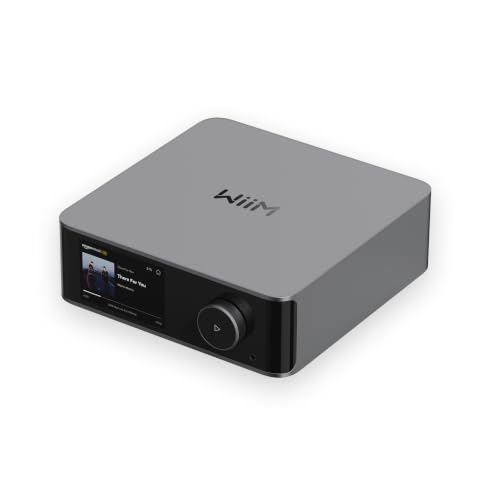

This guide is for listeners adding streaming to an existing stereo, a pair of powered speakers, or a TV-based system who specifically want an Ethernet port in reserve. Every model below was picked from the name and specifications stated on its own Amazon product page, and each one lists Ethernet among its connections rather than relying on Wi-Fi alone.
Quick Picks
As an Amazon Associate we earn from qualifying purchases.
| Product | Best for | Key spec from title |
|---|---|---|
| WiiM Ultra | A rack that also needs TV sound and a phono input | Music Streamer & Digital Preamp with 3.5″ Touchscreen |
| WiiM Pro Plus | Adding AirPlay 2 and Google Cast to an older stereo | AirPlay 2 Receiver, Google Cast Audio, Multiroom Streamer with Premium AKM DAC |
| Bluesound Node | Multiroom systems built around the BluOS app | Wireless Multi-Room High Resolution Music Streamer |
How to Choose
Start with the wired port, then check its speed
Ethernet is the whole point of this shortlist, yet the port itself still deserves a look. The WiiM listings state a 10M/100 Mbps LAN connection, while the Bluesound Node listing describes Gigabit Ethernet, and that difference matters if the same cable run also feeds a network drive full of large local files. For ordinary service streaming either speed is comfortable, but a listener pulling high-resolution albums from a NAS all evening should confirm the port speed on the product page instead of assuming every RJ45 socket behaves the same. After setup, start the highest-resolution album you own and browse the library from another room to confirm the app stays responsive.
Match the protocol list to your phone and services
A streamer only plays what its protocol list allows. The WiiM Pro Plus page names AirPlay 2, Google Cast Audio, DLNA, Spotify Connect, and TIDAL Connect, which suits a household split between iPhones and Android phones. The Bluesound Node works inside the BluOS ecosystem instead, so its value rises when other BluOS speakers already live in the house. Write down the two services you open daily, check them against the listing, and treat any missing name as a genuine stopping point rather than a detail an update might fix later. Households casting from a television app should confirm the same protocol covers video sources too.
Decide how the streamer will reach your amplifier
Outputs decide whether the box fits the system you own today. The WiiM Ultra lists RCA, headphone, coaxial, optical, and USB outputs, so it can feed an integrated amplifier directly or hand a digital signal to an external DAC you already trust. The Node leans on its own internal conversion with analogue and digital connections described on its page. If your amplifier has a DAC you love, pick a streamer with a digital output you can actually use, and if it has only analogue inputs, the quality of the built-in DAC becomes the deciding factor. A digital connection may also need a coaxial or optical lead you do not yet own.
Think about screens, remotes, and TV duty
Daily handling differs more than spec sheets suggest. The WiiM Ultra carries a 3.5-inch touchscreen and an HDMI ARC input, so it can sit under a television, show what is playing, and take TV sound through the same speakers. The Pro Plus ships with a voice remote and no screen, which suits a cabinet where the phone does everything. The Node has no display of its own and runs through its app. Choose based on where the unit will sit and who else in the house needs to operate it without your phone. A front display also helps during setup, when network choices are easier to follow on the unit itself.
The 3 Best Options
WiiM Ultra
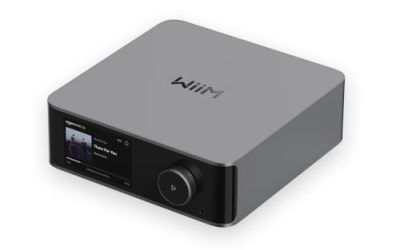
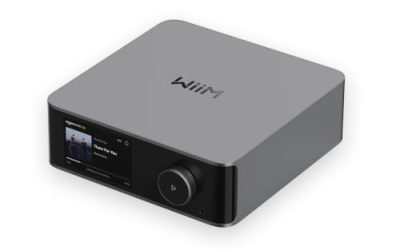
The Ultra fits the listener whose streamer also has to anchor a living-room system. Its page describes a digital preamp role alongside streaming, with a touchscreen on the front, an HDMI ARC input for television audio, and even a phono input for a turntable, so one compact box replaces several adapters around a rack. Listeners running powered speakers gain volume and source control in one place, while owners of a separate amplifier can still feed it through the analogue output and keep their existing remote habits mostly intact. Its headphone output also suits late-night listening in a shared living room.
Specs
- Connectivity Technology: Bluetooth, Ethernet, Wi-Fi
- Network: Wi-Fi 6 plus 10M/100 Mbps LAN
- DAC: ESS ES9038 Q2M
- Display: 3.5-inch touchscreen
- Audio inputs: HDMI ARC, Optical, Line, and Phono, up to 24-bit/192 kHz
- Audio outputs: RCA, Headphone, Coax, Optical, USB
- Model number: ASR004
Best for: A main living-room rack that needs streaming, TV sound, and a turntable input in one unit.
Watch out for: The wired LAN connection is 100 Mbps rather than gigabit, which only matters for heavy local-file households.
ASIN: B0D41YCLW8
WiiM Pro Plus
The Pro Plus is the straightforward upgrade for a good older stereo that predates streaming entirely. Its listing leads with AirPlay 2 and Google Cast, so both phone platforms in a mixed household can send music without workarounds, and the included voice remote covers the moments when nobody wants to unlock a phone just to skip a track. The premium AKM DAC named in the title is the reason to pick it over the plain Pro for analogue output duty into a revealing amplifier or a favourite pair of powered monitors. With no screen or television input, it stays focused on music alone.
Specs
- Connectivity: dual band Wi-Fi, BT5.1, Ethernet (100M)
- Protocols: AirPlay 2, Google Cast Audio, DLNA, Spotify Connect, TIDAL Connect, Amazon Music Casting
- DAC: Premium AKM DAC
- Playback: hi-res audio up to 24-bit/192 kHz on digital and analogue outputs
- Included: voice remote
- Model number: ASR003
Best for: Owners of a capable older amplifier who want both casting platforms and a remote in the box.
Watch out for: The listing states plainly that it is a receiver only for AirPlay 2 and cannot transmit AirPlay 2 to other speakers.
ASIN: B0CC2HWC7N
Bluesound Node
The Node suits a home already leaning toward a multiroom system run from one app. Its Amazon page presents it as a high resolution multi-room streamer, and the box contents listed there include an Ethernet cable, which makes the wired setup this guide is about genuinely immediate. HDMI eARC gives it a route into TV sound, and its analogue and digital connections let it slot into a traditional hi-fi rack. Buyers planning a second or third room later will feel the pull of staying inside the BluOS family from the first purchase, because the app knowledge, the service logins, and the grouping habits learned on this first unit carry straight over to every player added afterwards.
Specs
- Connectivity Technology: Ethernet, USB
- Inputs and outputs named on the listing: HDMI eARC, Bluetooth aptX, Ethernet, AirPlay 2, USB
- Built-in media listed: 120V AC power cord, Ethernet cable, TOSLINK optical to 3.5mm mini adaptor, stereo RCA to RCA cable
- Role: wireless multi-room high resolution music streamer
Best for: Households building a BluOS multiroom system room by room, starting with the main stereo.
Watch out for: This listing is the N130 generation of the Node, and Bluesound also sells newer Node models, so confirm the exact model name on the page before ordering.
ASIN: B0937LC7P2
Which One Fits Your Situation
Your router sits beside the stereo and the TV shares the speakers
Run a short cable into the WiiM Ultra and let one box handle streaming and television sound through HDMI ARC. The touchscreen means guests can see what is playing without asking for your phone, and the phono input keeps a turntable in the same system instead of competing for the amplifier’s only spare input. Wiring this room also frees your Wi-Fi for the portable speakers that genuinely have to stay wireless.
You own a good amplifier from before streaming existed
The WiiM Pro Plus was made for exactly this rack. It adds AirPlay 2 and Google Cast to equipment that has neither, its AKM DAC feeds your amplifier’s analogue input, and the voice remote restores the couch-side control that older systems lost when music moved onto phones and tablets and laptops alike. An Ethernet cable into the router removes the last excuse the system had for dropouts during long evening sessions.
You plan to add speakers in other rooms over the next year
Start with the Bluesound Node in the main room. Multiroom is its stated purpose, the included Ethernet cable gets the most important room wired from day one, and staying inside one app ecosystem now avoids running two competing control apps when the kitchen and bedroom join later, and each new room can copy the wired-first approach wherever a network socket is available, keeping the wireless band free for phones, tablets, and the portable speakers that move around the house.
Your network drive holds a large local music library
Wire whichever unit you choose and check the port speed against your habits. The Node’s gigabit Ethernet suits constant NAS traffic, while the two WiiM models list 100 Mbps LAN, which still streams services happily but is the slower road for a library that lives on network storage and gets browsed all evening by more than one person. In that house the port speed on the listing is not trivia.
Common Mistakes
- Assuming every streamer with Wi-Fi also has an Ethernet port, when many compact models are wireless only.
- Buying for a streaming service the protocol list on the product page never names.
- Feeding an amplifier through analogue outputs without checking which DAC the streamer actually contains.
- Placing the streamer where no cable can reach, on a shelf far from any network socket, and then blaming the wired port you never actually connected.
- Mixing two multiroom ecosystems in one house and juggling both apps forever.
- Running a long, loose Ethernet cable across a doorway instead of planning a tidy route along the wall, then blaming the streamer when someone trips and unplugs it mid-album.
Frequently Asked Questions
Does Ethernet sound better than Wi-Fi on these streamers?
The listing specifications describe connection methods, not sound signatures, so the honest answer is that Ethernet mainly buys stability. A wired link removes dropouts in homes where the router sits far from the rack or the Wi-Fi band is crowded. If your wireless connection never falters, the audible case for cabling is weak, but the reliability case stays strong either way. NAS listeners gain the most from that stability.
Can I use one of these streamers with powered speakers and no amplifier?
Yes, and the WiiM Ultra is shaped most clearly for that role because its page describes it as a digital preamp with a touchscreen and volume-friendly outputs including RCA and a headphone socket. The Pro Plus and Node also feed powered speakers through their analogue outputs, with control handled by remote or app instead of a front panel. Check the analogue output level suits your speakers before ordering.
What if my amplifier already has a DAC I want to keep using?
Choose a model with a digital output and let your existing DAC do the conversion. The WiiM Ultra lists coaxial, optical, and USB among its outputs, so it can act purely as a network transport. Check the output list on the product page before buying, because a streamer with only analogue outputs forces its own DAC into the chain.
Will these work for whole-home audio with speakers I already own?
Only inside their own ecosystems. The Node belongs to the BluOS multiroom family, while the WiiM models group with other WiiM and compatible casting devices named in their protocol lists. Speakers from an unrelated system will not join the group just because everything shares one router, so plan multiroom purchases around a single platform from the start. Wiring the fixed rooms makes those groups more dependable.
More from Amazon
Programs that pair well with the guide above. Offers and eligibility are set by Amazon and may change.
Free shipping on eligible items, Prime Video and more. Eligible new members can start with a free trial.
Start a Prime free trialAudiobooks and podcasts to listen to on the go. Eligible new members can start with a free trial.
Try Audible freeAd-free music streaming. Eligible new subscribers can start with a free trial.
Try Music Unlimited freeA free business account with business pricing and bulk-buying tools for work, shop or home office.
Create a business accountAs an Amazon Associate we earn from qualifying purchases.




Write Your Review
No reviews yet. Be the first to share your experience!