

Key takeaways
- Four battery-test electronic loads for training labs compared: 150W USB modules and a 400W benchtop unit with discharge modes and capacity counting.
A battery only tells the truth under load. For technical training programs, that simple fact turns an electronic load into core lab equipment: students connect a cell or pack, set a controlled discharge, and watch voltage, current, and capacity behave exactly the way the theory said they would. The right unit makes those lessons repeatable across a whole class, while the wrong one leaves instructors fighting loose connections, missing data, and discharge runs that stop early.
The four loads below cover the range a training lab actually needs, from compact USB-controlled modules that suit individual student benches to a full benchtop instrument for instructor demonstrations and larger packs. Each one discharges batteries in a controlled way and reports capacity, and each takes a different approach to power handling, software, and budget.
Quick Picks
As an Amazon Associate we earn from qualifying purchases.
| Product | Best for | Key spec from title |
|---|---|---|
| MakerHawk DL150B | Intro lab benches | 150W, 2–200V, 25A |
| ATORCH DL24P | App-logged capacity tests | 150W, 20A, four load modes |
| East Tester ET5410A+ | Instructor benchtop station | 400W, 150V, 40A |
| SKYRC BD380 | Robotics pack testing | 380W, 40A, 1–8S packs |
How to Choose
Match the power envelope to your battery inventory
Start with the largest pack your students will discharge, then work backwards. A load rated at 150W handles single cells and small packs comfortably, but a high-voltage pack at a modest current can exceed the wattage ceiling long before it reaches the current limit, and most compact loads reduce their allowed power further as voltage climbs. Benchtop units in the 380W to 400W class exist for exactly that reason. List the voltage, current, and wattage of your worst-case exercise, and pick a load that clears all three numbers with room to spare rather than one that barely meets them.
Decide which load modes the curriculum needs
Constant current discharge is the foundation of capacity testing, and every unit here offers it. Constant resistance mode, though, lets students model a fixed resistive load and compare the result against their own calculations, while constant power mode mirrors how real devices drain a battery. Constant voltage mode matters for power supply exercises more than for battery work. A load that covers all four modes supports a wider set of lab exercises without extra equipment, so check the mode list against your lesson plans instead of assuming every tester behaves the same way.
Plan how students will capture and keep data
A discharge curve is the deliverable in most battery labs, so the data path deserves as much attention as the power stage. Some loads stream to PC software over USB, others pair with a phone app over Bluetooth, and a few do both. Software that exports curves or spreadsheets makes grading and lab reports far easier than transcribing numbers off a small screen. Consider also what happens across a classroom set: if thirty students run tests at once, a simple, consistent logging workflow will save more instructor time than any single hardware feature.
Check wiring, sensing, and power requirements
Small details decide whether a load survives a semester of student use. Four-wire measurement removes lead resistance from the reading, which matters when students compare their results against calculated values. Some modules need a separate low-voltage supply just to run their own electronics, and that extra wall adapter per bench adds up quickly. Terminal style matters too: chunky screw terminals forgive beginner wiring mistakes better than delicate connectors. Finally, confirm the cooling approach, because a fan-cooled load running near its limit for a full lab period will get loud and hot.
The 4 Best Options
MakerHawk DL150B

This compact module is the natural starting point for a bench where students are learning discharge testing for the first time. It covers an unusually wide voltage span for its size, so the same unit can pull down a single lithium cell in one exercise and a much higher-voltage pack in the next. Control runs through a computer over USB, with software that handles online control and supports soft calibration, which gives instructors a clean way to demonstrate setup, start a run, and review the discharge curve on a projector. Because the module itself is small and light, equipping a full row of student benches stays manageable.
Specs
- Maximum power: 150W
- Voltage range: 2–200V
- Current range: 0.2–25A
- Control: USB connection with PC software and online control
- Calibration: soft calibration supported
- Module power: DC 6–12V via DC5.0 port or Micro USB
- Dimensions: 6.42 x 4.33 x 2.36 inches
Best for: introductory labs that want PC-logged discharge curves on every student bench without benchtop-instrument bulk.
Watch out for: the module needs its own 6–12V supply to operate, so budget a power source per bench, and the 150W ceiling arrives quickly with higher-voltage packs.
ATORCH DL24P

Where the MakerHawk leans on a computer, this unit splits control between its own display and connected software, which suits labs that mix bench work with take-home analysis. It runs the four standard load modes and uses four-wire measurement, so voltage readings stay honest even with the thin leads students tend to grab first. A Bluetooth app and PC software both connect to the unit, and the software side can export data to a spreadsheet, making it practical for students to attach real discharge data to their reports. The adjustable current, voltage, and power settings give instructors fine control over how aggressive each exercise is.
Specs
- Maximum power: 150W
- Test voltage: 2–200V
- Working current: 0.2–20A
- Load modes: constant current, constant resistance, constant power, constant voltage
- Measurement: four-wire
- Connectivity: Bluetooth app and USB PC software with spreadsheet export
- Operation: requires a separate 12V DC supply
Best for: programs that want app-based logging and spreadsheet exports from an affordable bench module.
Watch out for: full power is only available below 36V, dropping to 60W between 36V and 80V and 45W above that, and the on-device capacity readout tops out at 99999mAh, so long tests need the app for complete records.
East Tester ET5410A+
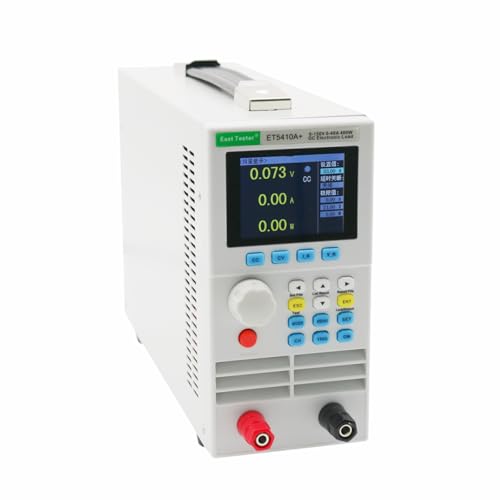
Every training lab benefits from one serious instrument at the front of the room, and this benchtop unit fills that role. It pairs the highest power handling in this group with proper dual current ranges, so it stays accurate at the small currents used in cell-level exercises and still handles large pack discharges. A dedicated battery test mode discharges in constant current or constant resistance, counts amp-hours and watt-hours, and stops at a set voltage, which maps neatly onto capacity-grading exercises. The color TFT screen and USB interface round out a unit that behaves like the professional loads students will meet in industry.
Specs
- Maximum power: 400W
- Load input: 0–150V, 0–40A
- Constant current ranges: 0–3A and 0–40A
- Constant voltage ranges: 0.1–19.999V and 0.1–150V
- Constant resistance ranges: 0.05Ω–1kΩ and 1kΩ–4.5kΩ
- Battery test mode: constant current or constant resistance discharge with Ah and Wh counting and stop voltage
- Display: 2.8-inch TFT, 320 x 240
- Interface: USB
- Power input: 110–220V
- Dimensions: 90 x 190 x 300 mm
Best for: the instructor station or advanced lab where one instrument must handle everything from single cells to large packs.
Watch out for: it is a mains-powered benchtop box with real size and weight, so it anchors one station rather than equipping every bench, and its wide ranges reward careful setup by the instructor.
SKYRC BD380

Robotics programs discharge a specific kind of battery over and over: multi-cell packs that need a hard, honest pull-down before anyone trusts them in competition. This discharger and analyzer is built around that job, with power handling close to the benchtop class in a unit that still travels between classrooms. It discharges in four modes and talks to both a Bluetooth app and the Charger Master software for PC and Mac, which exports discharge curves students can include in engineering notebooks. Support for packs from a single cell up to eight cells in series covers the range most school and club robots actually run.
Specs
- Maximum discharge power: 380W
- Maximum current: 40A
- Load voltage: 3–40V
- Pack support: 1–8S
- Discharge modes: constant current, constant resistance, constant power, constant voltage
- Connectivity: Bluetooth app and USB Type-C
- Software: Charger Master for PC and Mac with curve export
- Part number: SK-600153
- Dimensions: 8.25 x 6.5 x 6 inches
- Weight: 2.72 lb
Best for: robotics teams and STEM programs that grade multi-cell packs and want exportable discharge curves for documentation.
Watch out for: the 40V ceiling rules out higher-voltage packs, and the unit focuses on discharge only, so charging still happens on separate equipment.
Which One Fits Your Situation
Equipping a full classroom of beginners
Choose between the two 150W modules based on how students will record results. If every bench already has a computer, the MakerHawk DL150B keeps the workflow in one place with its USB software and calibration support. If students work from phones or shared tablets, the ATORCH DL24P and its Bluetooth app fit better. Either way, order a suitable low-voltage supply for each module at the same time, because neither unit runs its electronics from the battery under test.
Running one demonstration station for advanced classes
The East Tester ET5410A+ earns its bench space here. Its dual current ranges keep small-signal exercises accurate, the battery test mode handles capacity grading with a proper stop voltage, and the 400W ceiling covers demonstration packs that would overwhelm a module. Advanced students also gain exposure to the control layout and terminology of professional electronic loads, which transfers directly to industry equipment. Keep it as the shared reference instrument and let the smaller modules handle routine student throughput.
Supporting a robotics team through a season
Pick the SKYRC BD380 when the battery inventory is mostly multi-cell packs in the one-to-eight-cell range. A full discharge at up to 40A reveals weak packs quickly, and the exported curves give the team a written record to justify retiring or trusting a pack before an event. The Bluetooth app helps during pit-side checks, while the desktop software suits the deeper analysis sessions back in the classroom. Pair it with the chargers the team already owns, since this unit only discharges.
Building a mixed lab on a staged budget
Start with modules for student benches in the first term, then add one benchtop unit once the curriculum reaches pack-level testing. This sequence spreads the cost across budget cycles and matches equipment to the exercises students are actually running. The modules cover cell-level capacity work from day one, and the ET5410A+ later unlocks higher-voltage and higher-current lessons without replacing anything already bought. Programs that also run robotics can substitute the BD380 as the second-stage purchase instead.
Common Mistakes
- Buying on wattage alone and ignoring the voltage-dependent power limits, then discovering the load cannot sustain the planned discharge on higher-voltage packs.
- Forgetting that compact load modules need their own operating power, so the benches end up short of adapters on the first lab day.
- Letting students measure through two-wire leads with long, thin cables and then treating the sagging voltage readings as battery behavior.
- Skipping the stop voltage setting, which lets a discharge run a cell far below its safe floor and ruins both the battery and the lesson.
- Recording results by hand from the display instead of using the software or app export, introducing transcription errors into graded work.
Frequently Asked Questions
What size electronic load does a training lab actually need?
Most cell-level and small-pack exercises fit inside a 150W load, especially where each student bench runs its own tests at modest currents. Programs that discharge large multi-cell packs, or that want one demonstration instrument for the whole room, should look at the 380W to 400W class instead. Match the load to the largest pack in your inventory across voltage, current, and wattage together, not just one figure.
Why does four-wire measurement matter for battery testing?
With two-wire leads, the resistance of the cables themselves drops voltage as current flows, and the load cannot tell that drop apart from the battery’s own behavior. Four-wire sensing measures voltage on separate sense leads that carry almost no current, so the reading reflects the battery terminals rather than the wiring. For students comparing measured capacity against theory, that difference decides whether their numbers agree with the calculation or drift for reasons they cannot see.
Can these loads test lead-acid batteries as well as lithium packs?
Yes, provided the pack voltage and the desired discharge current sit inside the load’s ratings. The discharge principle is identical: set a constant current, set a stop voltage appropriate for the chemistry, and let the unit count amp-hours until it reaches the cutoff. Lead-acid packs in training fleets are often higher voltage, so confirm the load’s power limit at that voltage before scheduling the exercise, since several compact units reduce allowed wattage sharply as voltage rises.
Do students need a computer to use these testers?
Not always. The ATORCH DL24P and SKYRC BD380 both work with phone apps over Bluetooth, and the East Tester ET5410A+ runs from its own front panel and screen. The MakerHawk DL150B is the most computer-dependent of the group, since its control and logging live in the PC software. For graded work, though, any path that exports the discharge data will serve students better than copying numbers by hand.
More from Amazon
Programs that pair well with the guide above. Offers and eligibility are set by Amazon and may change.
Free shipping on eligible items, Prime Video and more. Eligible new members can start with a free trial.
Start a Prime free trialAudiobooks and podcasts to listen to on the go. Eligible new members can start with a free trial.
Try Audible freeAd-free music streaming. Eligible new subscribers can start with a free trial.
Try Music Unlimited freeA free business account with business pricing and bulk-buying tools for work, shop or home office.
Create a business accountAs an Amazon Associate we earn from qualifying purchases.



Write Your Review
No reviews yet. Be the first to share your experience!