

Key takeaways
- Find the best network audio streamers with USB playback for your hi-fi system, from USB drive playback to USB output for an external DAC.
Introduction
A network audio streamer brings streaming services, internet radio, and a home music library into a stereo system that was never built for the internet. Add USB playback to that mix and the streamer becomes far more flexible: it can play music stored on a USB flash drive or an external hard drive, or it can send a clean digital signal over USB to a separate DAC. That combination matters because many listeners keep part of their collection offline, whether it is a folder of high-resolution downloads, a ripped CD library, or files a streaming service does not carry.

The best network audio streamers with USB playback handle both jobs without fuss. They connect to a home network over Wi-Fi or Ethernet, support the streaming services and protocols a household already uses, and treat a USB device as a first-class source rather than an afterthought. Some models read files directly from a plugged-in drive and present them in the same app used for streaming. Others act as a digital transport, passing audio over USB to an external DAC so the listener can choose the conversion hardware separately.
Choosing among them comes down to how the USB connection will actually be used. A listener who wants to plug in a drive full of FLAC files and press play needs a streamer with a USB host port and a library browser. A listener who already owns a capable DAC needs a streamer with a stable USB audio output. A listener building a whole-home system needs multiroom support and a control app the whole household can understand. This guide covers four streamers that take different approaches to the same idea, so the right match depends on the system it will join and the way music will be played through it.
At a Glance
| Streamer | USB Playback Role | Network Connection | Control | Best For |
|---|---|---|---|---|
| WiiM Ultra | USB drive playback and USB audio output | Dual-band Wi-Fi and Ethernet | Touchscreen, app, voice remote | A full-featured hub for a main system |
| Bluesound NODE | USB drive playback | Dual-band Wi-Fi and gigabit Ethernet | BluOS app and touch controls | A polished multiroom streamer |
| FiiO SR11 | USB audio output to an external DAC | Dual-band Wi-Fi and gigabit Ethernet | App, LCD display, control knob, remote | A digital transport for an existing DAC |
| Arylic S50 Pro+ | USB pen drive playback | Wi-Fi and Ethernet | 4STREAM app and remote | A compact streamer and preamplifier |
WiiM Ultra
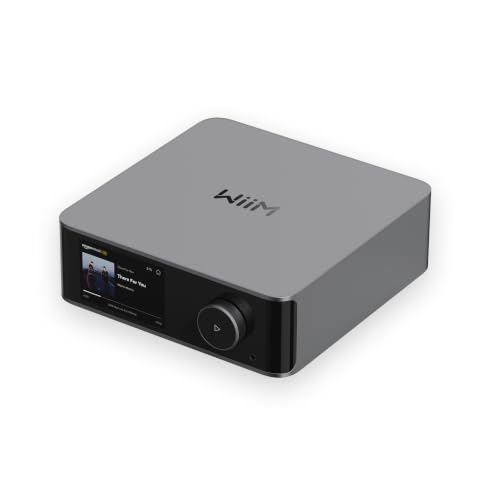
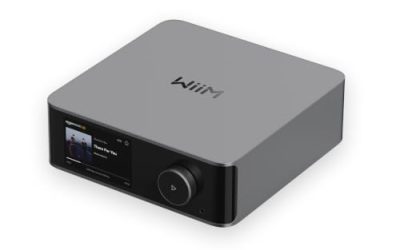
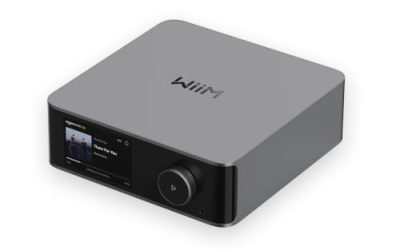
The WiiM Ultra is the most complete single box in this group. It is a music streamer and digital preamplifier with a 3.5-inch color touchscreen, a volume knob, and a voice remote, so it can be operated from the listening position as well as from a phone. It streams from Spotify, Amazon Music, TIDAL, and other services, and it supports Google Cast, AirPlay, Spotify Connect, TIDAL Connect, and Alexa. A USB port on the rear accepts a flash drive or external drive, and music stored on it can be browsed and played through the WiiM Home app alongside streaming sources.
Listing features:
- 3.5-inch touchscreen with album art, track information, and playback controls
- USB port for playback from a connected flash drive or external drive
- ESS DAC with support for high-resolution audio up to 24-bit and 192 kHz
- HDMI ARC input for TV audio, plus phono input for a turntable
- Optical, coaxial, RCA, and subwoofer outputs, plus a headphone output
- Dual-band Wi-Fi, Ethernet, and Bluetooth 5.3
- RoomFit room correction and a built-in equalizer
- Multiroom audio with other WiiM devices
Considerations:
- The touchscreen and the number of inputs add setup steps compared with a simpler streamer, so the first configuration session takes a little patience.
- Listeners who already own a separate preamplifier may not need the built-in volume control, phono stage, and HDMI ARC input.
- The USB port handles drive playback, and large libraries benefit from a drive formatted in a widely supported file system and organized into clearly named folders.
- A wired Ethernet connection is worth using when the streamer sits near the router, since it keeps high-resolution streams steady.
Bluesound NODE
The Bluesound NODE is a wireless multiroom high-resolution music streamer built around the BluOS platform. It connects to a stereo system or a pair of powered speakers and brings streaming services, internet radio, and local network libraries into one app. Its USB Type-A port accepts an external drive, so a personal music collection can be plugged in directly and browsed from the same BluOS interface used for streaming. The NODE supports audio resolution up to 24-bit and 192 kHz and includes HDMI eARC, optical, coaxial, and RCA outputs, plus a subwoofer output.
Listing features:
- USB Type-A port for playback from a connected external drive
- BluOS multiroom platform with support for Spotify, TIDAL, Amazon Music, Qobuz, Deezer, and internet radio
- High-resolution audio support up to 24-bit and 192 kHz
- Dual-band Wi-Fi and gigabit Ethernet
- HDMI eARC input for TV audio
- Optical, coaxial, RCA, and subwoofer outputs
- Bluetooth aptX HD for wireless playback from a phone or tablet
- Touch controls on the top panel and voice control through Alexa
Considerations:
- The BluOS app is the main control surface, so comfort with a phone or tablet app matters more here than with a streamer that has a full front display.
- The NODE is a streamer only, with no built-in amplification, so it needs an amplifier or powered speakers to produce sound.
- A USB drive used with the NODE should be organized into folders by artist and album, which makes browsing a large collection far easier in the app.
- Households planning multiroom audio should confirm that every room uses compatible BluOS players, since the platform works best within its own ecosystem.
FiiO SR11
The FiiO SR11 takes a different approach from the other streamers here. It is a compact streaming receiver and digital transport rather than an all-in-one player: it has no internal DAC and no analog output. Instead, it receives music over the network and sends it out over USB, optical, or coaxial to an external DAC or decoding device. Its dual USB outputs feed a DAC with PCM up to 768 kHz and 32-bit and DSD256 under Roon Ready playback, while the optical and coaxial outputs cover PCM up to 192 kHz and 24-bit. For a listener who already owns a DAC they like, the SR11 adds network streaming and USB output without duplicating conversion hardware.
Listing features:
- Dual USB outputs for connection to an external DAC
- AirPlay and Roon Ready streaming support
- Dual-band Wi-Fi and gigabit Ethernet
- Optical and coaxial digital outputs
- Custom LCD display and control knob for local status and settings
- Infrared remote control included
- Support for high-resolution audio up to 768 kHz and 32-bit and DSD256 over USB
Considerations:
- The SR11 cannot connect directly to an amplifier with RCA cables, since it has no analog output and no internal DAC.
- Its streaming protocol list is narrower than some rivals, centering on AirPlay and Roon Ready rather than a long list of native service apps.
- The USB outputs are the main reason to choose this model, so it fits best in a system where a capable external DAC is already in place.
- Placement near the DAC keeps the USB cable short, which is good practice for any USB audio connection.
Arylic S50 Pro+
The Arylic S50 Pro+ is a wireless streaming preamplifier that combines a network streamer, a DAC, and a preamplifier in a compact silver enclosure with two antennas. It plays music from a USB pen drive through its USB host port, streams over Wi-Fi and Ethernet, and accepts Bluetooth 5.0 with aptX HD. The 4STREAM app controls playback across Spotify, Amazon Music, TIDAL, Qobuz, Deezer, Napster, TuneIn, and internet radio, along with DLNA and UPnP sources such as a NAS. A front display, an infrared remote, and a subwoofer output round out a package aimed at listeners who want streaming and local USB playback in one small preamplifier.
Listing features:
- USB host port for playback from a USB pen drive
- Wi-Fi, Ethernet, and Bluetooth 5.0 with aptX HD
- ESS SABRE DAC with support for audio up to 24-bit and 192 kHz
- RCA, optical, and coaxial outputs, plus a subwoofer output
- 4STREAM app with multiroom support and DLNA and UPnP playback
- AirPlay and Spotify Connect support
- Front display and infrared remote control
- 12V trigger output for integration with other components
Considerations:
- The 4STREAM app is functional but more basic than the control apps of larger platforms, so listeners who value a polished app experience should weigh that.
- The USB host port has a track limit for pen drive browsing, so very large drive libraries are better split across folders or kept on a NAS instead.
- Wi-Fi is limited to the 2.4 GHz band, which is fine for audio streaming but makes a wired Ethernet connection the better choice where one is available.
- The S50 Pro+ works as a preamplifier, so it pairs naturally with a power amplifier or powered speakers rather than with a separate preamplifier.
How to Choose
Start with the USB question, because it splits this group cleanly. If the plan is to plug a flash drive or external hard drive into the streamer and play files from it, the WiiM Ultra, Bluesound NODE, and Arylic S50 Pro+ all support that directly. If the plan is to send audio over USB to a DAC that is already owned, the FiiO SR11 is built for exactly that job, and the WiiM Ultra also provides a USB audio output. Confirm which direction the USB connection runs before choosing, since a USB host port and a USB audio output serve different purposes.
Next, look at the streaming services and protocols the household uses. A streamer that supports Spotify Connect, TIDAL Connect, AirPlay, Google Cast, and Roon Ready covers most listening habits, but no single model supports every protocol. Listeners deep in the Apple ecosystem lean toward AirPlay support, Roon users need Roon Ready certification, and multiroom households should pick one platform and stay with it so every room can be grouped and controlled together.
Sound quality depends on the whole chain, not on the streamer alone. A streamer with a built-in DAC, such as the WiiM Ultra, Bluesound NODE, or Arylic S50 Pro+, can connect directly to an amplifier or powered speakers. A transport such as the FiiO SR11 depends entirely on the external DAC it feeds. Either route can sound excellent; the difference is whether the listener wants to choose the DAC separately or have it included.
Finally, consider the control experience. A touchscreen and remote suit a main listening room where the streamer sits within reach. An app-only streamer suits a system controlled from a phone or tablet, and a household with several listeners should pick an app everyone finds easy to use. The control app is used every day, so it deserves as much attention as the specification sheet.
Fit and Installation Considerations
Placement is straightforward but worth planning. Every streamer here needs a stable network connection, so placing it within reach of the router or an Ethernet cable avoids dropouts during high-resolution playback. Wi-Fi works well in most rooms, but a wired connection is the steadier option when the streamer sits near network equipment. Keep the streamer away from heat sources and give it room to breathe, especially in a closed cabinet with an amplifier.
Connecting a USB drive takes a little preparation. Format the drive in a widely supported file system, organize music into folders by artist and album, and use consistent file naming so the library browser stays readable. Large drives with thousands of tracks can take a while to index on the first connection, so allow time for the initial scan before judging browsing speed. Keep a backup of the music library elsewhere, since a drive used daily for playback is still a single copy.
Cabling is simple: a short, good-quality USB cable between the streamer and a DAC, and RCA, optical, or coaxial cables to the amplifier depending on which output sounds best in the system. Connect the streamer to the amplifier input that matches the chosen output, set the amplifier to that input, and run through the streamer app setup to join the home network. Firmware updates arrive through the app on most models, so check for an update during setup and install it before the first serious listening session.
Frequently Asked Questions
What does USB playback mean on a network audio streamer?
It can mean two things. On some streamers, a USB host port reads music files from a plugged-in flash drive or external hard drive and plays them through the system. On others, a USB audio output sends the digital signal to an external DAC. Some models, such as the WiiM Ultra, support both roles, so check the specifications for the exact USB behavior of any model under consideration.
Can a network streamer play music from a USB drive without an internet connection?
A streamer can play files from a connected USB drive over the local network, but most models still need a network connection for app control, since the phone app talks to the streamer over Wi-Fi. Streaming services and internet radio do need internet access. For offline listening, keep the drive plugged in and the streamer on the home network.
Do I need a separate DAC with a network audio streamer?
It depends on the model. Streamers with a built-in DAC, such as the WiiM Ultra, Bluesound NODE, and Arylic S50 Pro+, connect directly to an amplifier or powered speakers. A transport such as the FiiO SR11 has no internal DAC, so it must feed an external DAC or decoding device before the signal can reach an amplifier.
Which file formats can these streamers play from USB?
Most models in this guide support common lossless and lossy formats, including FLAC, WAV, ALAC, AAC, and MP3, with high-resolution support varying by model. The FiiO SR11 reaches the highest listed resolutions over USB when paired with a capable DAC, while the other models cover the resolutions most listeners use. Check the file format list for the chosen model before moving a large library onto a drive.
Conclusion
The best network audio streamers with USB playback are the ones that match how music will actually be played. The WiiM Ultra covers the most ground, with USB drive playback, USB audio output, a touchscreen, and a wide range of inputs for a main system. The Bluesound NODE suits a polished multiroom setup built around the BluOS app, with direct USB drive playback and strong high-resolution support. The FiiO SR11 is the pick for a listener who already owns a DAC and wants a compact network transport with a capable USB output. The Arylic S50 Pro+ brings USB pen drive playback, streaming, and preamplifier duties together in a compact and affordable package.
Before choosing, settle the USB question first, then match the streaming services, control app, and outputs to the rest of the system. A streamer that fits the way music is stored and played will stay in the system for years, while one chosen on specifications alone can leave a USB drive or a DAC unused. Pick the model whose USB role, app, and connections line up with the setup it will join.
As an Amazon Associate, we earn from qualifying purchases.
More from Amazon
Programs that pair well with the guide above. Offers and eligibility are set by Amazon and may change.
Free shipping on eligible items, Prime Video and more. Eligible new members can start with a free trial.
Start a Prime free trialAudiobooks and podcasts to listen to on the go. Eligible new members can start with a free trial.
Try Audible freeAd-free music streaming. Eligible new subscribers can start with a free trial.
Try Music Unlimited freeA free business account with business pricing and bulk-buying tools for work, shop or home office.
Create a business accountAs an Amazon Associate we earn from qualifying purchases.



Write Your Review
No reviews yet. Be the first to share your experience!