

Key takeaways
- Find the best wide-format heated laminators for training departments, from 27-inch roll machines for posters, safety signs and course materials compared.
A training department laminates a different mix of work than a typical office. One week the job is a set of classroom posters, wall charts and safety signs that will stay up for a full course cycle. The next week it is attendance sheets, equipment tags, table cards, checklists and handouts that learners will handle, spill coffee on and carry out to a workshop floor. A small pouch machine handles the little jobs one sheet at a time, but it cannot take a wide poster in a single pass, and feeding dozens of pages through a narrow slot quickly becomes the bottleneck in course preparation.
That is why the best wide-format heated laminators for training departments are roll machines. A heated roll laminator pulls film from two rolls, seals both sides of a document as it passes between heated rollers or heat shoes, and keeps going for as long as the roll lasts. With a 27-inch laminating width, a trainer can protect a full-size poster without trimming it down, run several smaller handouts side by side across the web, or laminate long banners and timelines that no desktop machine could accept.
This guide focuses on two 27-inch thermal roll laminators that suit training use: the GBC Ultima 65 and the GBC Pinnacle 27 EZLoad. Both are heated machines, both take wide roll film, and both are built to sit in a shared preparation room where several instructors may use them across a day. The sections below explain where each one fits, list the specifications that matter, and then walk through how to choose film, set temperature and plan the workspace before a department commits to a machine of this size.
Disclosure: As an Amazon Associate, I earn from qualifying purchases made through links in this article.
Quick Picks
- Best for shared training preparation rooms: GBC Ultima 65 Thermal Roll Laminator (1710740). A 27-inch thermal roll machine with a warm-up time under 10 minutes, an AutoSpeed setting that selects a suitable laminating speed, a footage counter, a pivoting feed table and AutoGrip shafts for standard film. It suits departments that load both EZ Load and standard NAP I film up to 3 mil.
- Best for fast, guided film loading: GBC Pinnacle 27 EZLoad Thermal Roll Laminator (1701720EZ). A 27-inch thermal roll machine with an 8 to 10 minute warm-up, laminating speeds up to 10 feet per minute, EZLoad colour-coded end caps, a temperature readout and a footage counter. It suits departments that run both NAP I and NAP II roll film up to 3 mil and want loading mistakes kept to a minimum.
If the department mainly laminates posters, signage and long teaching aids, either machine covers the width. The real choice is about film system and workflow: the Ultima 65 gives more flexibility with standard film, while the Pinnacle 27 EZLoad is centred on guided EZLoad film loading and a clear temperature display for operators who laminate less often.
1. GBC Ultima 65 Thermal Roll Laminator, 27-Inch (1710740)
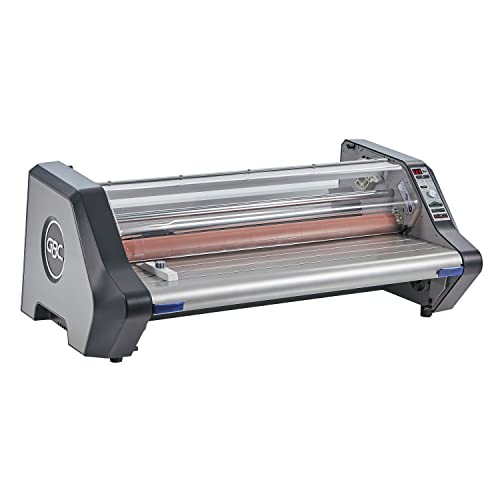
The GBC Ultima 65 is a thermal roll laminator with a maximum laminating width of 27 inches, which is the working width most training departments actually need. It is wide enough for standard poster stock, flip-chart sheets, large diagrams and safety signage, yet it still fits on a sturdy table or stand in a preparation room rather than needing a dedicated print-shop floor. For a department producing course materials in batches, that balance of width and footprint is the main reason this class of machine is so widely used in education settings.
Heat is central to how the Ultima 65 works. It is a hot laminator designed for standard temperature NAP I film, and it warms up in less than 10 minutes. In a training context that warm-up time shapes the working routine: switch the machine on at the start of a preparation session, lay out and trim the printed pieces while it heats, then run the whole batch in one continuous pass. The AutoSpeed feature selects the laminating speed for the material being fed, which helps occasional operators who may not know which manual speed suits a given film and document combination.
Film handling is the other strength to note. The Ultima 65 works with GBC EZ Load grey cap NAP I film and with standard NAP I roll film up to 3 mil thick, on a 1-inch core. EZ Load film uses colour-coded end caps that show the correct loading direction, reducing the classic roll-laminator mistake of loading film with the adhesive side facing the wrong way. The pivoting feed table gives access to the rollers without removing the table, and AutoGrip shafts make it easier to add and remove standard film rolls. A footage counter tracks how much film remains, which matters when a department shares one machine and nobody wants a roll to run out halfway through a set of classroom posters.
Practical details for daily training use include front and back stop buttons, so an operator can pause the run from either side of the machine, alignment guides to keep documents feeding straight, and a built-in trimmer for cutting finished pieces from the web. A slow forward and reverse function helps clear a misfeed. For safety in a shared room, the machine has a protective shield, enters standby after two hours of inactivity and shuts off after three hours.
Specifications
- Maximum laminating width: 27 inches
- Type: Thermal (hot) roll laminator
- Warm-up time: Less than 10 minutes
- Film compatibility: EZ Load grey cap NAP I film and standard NAP I roll film, up to 3 mil
- Core diameter: 1 inch
- Rollers: 2
- Speed control: AutoSpeed, with variable laminating speed
- Additional features: Pivoting feed table, AutoGrip shafts, footage counter, built-in trimmer, front and back stop buttons, protective shield, standby after 2 hours and shut-off after 3 hours of inactivity
- Colour: Grey
- Item weight listed: 116 pounds
Pros
- 27-inch width covers posters, charts and wide teaching aids in one pass
- Accepts both EZ Load and standard NAP I film, so a department is not locked into one supply type
- AutoSpeed reduces guesswork for instructors who laminate only occasionally
- Footage counter and pivoting table make film changes and planning easier
- Stop buttons on the front and back suit two-person handling of large sheets
Cons
- Film is sold separately, so rolls need to be ordered alongside the machine
- At the listed weight, it is a stay-in-place machine rather than one to move between rooms
- Limited to film up to 3 mil, so very thick rigid work is outside its range
- Warm-up, while under 10 minutes, still needs planning before a short session
View the GBC Ultima 65 on Amazon
2. GBC Pinnacle 27 EZLoad Thermal Roll Laminator, 27-Inch (1701720EZ)

The GBC Pinnacle 27 EZLoad is also a 27-inch thermal roll laminator, but its design leans harder into guided operation. It uses AccuTherm heating technology, which the maker describes as providing consistent heat for clear lamination across long runs. For a training department, long runs are the normal case: a full class set of laminated cards, a corridor of safety signs, or a term’s worth of wall displays. Consistent heat across that kind of run is what keeps the first sheet and the last sheet looking the same.
The Pinnacle 27 EZLoad warms up in 8 to 10 minutes and laminates at speeds up to 10 feet per minute. It runs both NAP I high-melt and NAP II low-melt roll films up to 3 mil thick. That wider film compatibility is useful where a department laminates heat-sensitive prints with a low-melt film as well as everyday posters with standard film. Variable temperature control, a digital temperature readout and a ready indicator help the operator confirm the machine is at the right setting before feeding valuable printed material.
Loading is handled through the EZLoad system. Colour-coded end caps on the film rolls match the machine, so the film can only be fitted the intended way, and a footage counter shows how much film is left. A built-in horizontal trimmer cuts finished work from the web, an auto reverse function helps back out a misfeed, and the control panel keeps the main settings in one place. The machine goes into standby after a period without use and shuts off later, which is a sensible safeguard in a busy training centre where a laminator may be left on between sessions.
For departments where several trainers share one machine and experience levels vary, this combination of guided loading, visible temperature information and a footage counter lowers the chance of wasted film and spoiled posters. The trade-off is that the EZLoad approach works best when the department standardises on compatible EZLoad film for this machine, rather than mixing many different roll types.
Specifications
- Maximum laminating width: 27 inches
- Type: Thermal (hot) roll laminator
- Warm-up time: 8 to 10 minutes
- Laminating speed: Up to 10 feet per minute
- Film compatibility: NAP I and NAP II roll film, up to 3 mil, including EZLoad film in 25-inch and 27-inch widths
- Heating technology: AccuTherm
- Additional features: EZLoad colour-coded end caps, digital temperature readout, footage counter, built-in horizontal trimmer, auto reverse, ready indicator, auto standby and shut-off after inactivity
- Colour: Blue and grey
Pros
- Runs both NAP I and NAP II film, covering standard and low-melt work
- EZLoad colour-coded caps make incorrect film loading much harder
- Temperature readout and footage counter give operators clear status information
- Speed up to 10 feet per minute suits long batch runs of course materials
- Auto reverse helps recover a misfed sheet without opening the machine
Cons
- Best results come from staying with compatible EZLoad film, which limits supply mixing
- Film is not the focus of the machine package, so rolls are a separate purchase
- Large, heavy format needs a permanent, level surface in the preparation room
- Film thickness is capped at 3 mil, as with the other machine in this guide
View the GBC Pinnacle 27 EZLoad on Amazon
How to Choose a Wide-Format Heated Laminator for a Training Department
Start with the widest item the department really prints. If the largest regular job is a 24-inch poster or a flip-chart page, a 27-inch machine gives working margin on each side, which helps alignment and leaves a clean sealed edge. Buying far beyond the actual print width adds weight, film cost per roll and storage bulk without improving the finished materials, so match the machine to the printer and paper sizes already in use.
Check film compatibility before anything else. Roll laminators are tied to their film systems. Note the film family, such as NAP I or NAP II, the maximum thickness in mil, the roll width and the core diameter each machine accepts. A department that already holds stock for an existing machine should list that stock first. Choosing a new laminator that cannot use the film already on the shelf creates waste, while choosing one that matches existing rolls keeps the changeover simple.
Think about who will operate the machine. In many training departments the laminator is used by administrators, instructors and occasional helpers, not by a single trained print technician. Guided film loading, a clear temperature readout, a footage counter and an auto reverse function all reduce the learning curve and the amount of film lost to loading errors. AutoSpeed or a small number of clear speed settings can matter more than a long list of manual controls that nobody adjusts correctly.
Plan for warm-up and throughput together. Heated roll machines in this class need roughly 8 to 10 minutes to reach working temperature. That is rarely a problem when lamination is batched, but it is a poor fit for one urgent sheet at a time. Estimate the real workload in feet of film per session: posters and signage for a new course, replacement signs, and class sets of reusable cards. Speed in feet per minute then tells you whether a preparation session fits into the time between classes.
Measure the room, not just the machine. A 27-inch laminator needs clear space in front for feeding and behind for finished work to exit without curling against a wall. Large laminated posters need a flat table to cool on, and film rolls need dry storage away from heat. Check the doorway and the route from delivery point to preparation room as well, because machines in this class are heavy and are best moved once, by two people, onto a stable surface.
Build safety and shutdown into the routine. Look for a protective shield over the heated area, accessible stop controls and automatic standby or shut-off after inactivity. Then add department habits: one named person checks the machine at the end of the day, film offcuts go straight into a bin so they cannot wrap around rollers, and the trimmer is used rather than loose blades near finished posters.
Budget for the whole system. The machine is only part of the working setup. A department also needs suitable roll film in the right width and thickness, a stand or a table that can take the weight, spare rolls so a course deadline never waits on a delivery, and a simple log of film use. The footage counter on both machines in this guide helps that log stay honest, because usage is visible rather than guessed.
Frequently Asked Questions
Why choose a heated roll laminator instead of a pouch machine for training materials?
A heated roll machine laminates continuously from film rolls, so wide posters, banners and long charts go through in one pass and batches of smaller items can be fed side by side. A pouch machine seals one pouch at a time and is limited by pouch width, which makes it slow and impractical for wide-format training displays.
What does 27-inch laminating width mean in practice?
It means the machine accepts documents and film up to 27 inches wide. A training department can laminate standard posters, large diagrams and flip-chart sheets whole, or place several letter-size handouts across the width of the film and trim them apart afterwards, using the roll more efficiently.
What is the difference between NAP I and NAP II film?
NAP I is standard temperature film for everyday paper and posters. NAP II is a low-melt film that seals at a lower temperature, which can suit heat-sensitive prints. A machine that runs both types, such as the Pinnacle 27 EZLoad listed above, gives a department more choice; a machine listed for NAP I only should be paired with NAP I rolls.
How thick is 3 mil film, and is it enough for classroom use?
Film thickness is measured in mil. A 3 mil film gives a flexible but durable finish that protects posters, signs and handouts from handling, moisture and frequent cleaning, while still allowing items to be rolled for storage. Thinner film is more flexible and drapes more; the machines in this guide accept film up to 3 mil.
How long does a wide-format heated laminator take to warm up?
The machines in this guide warm up in under 10 minutes for the Ultima 65 and in 8 to 10 minutes for the Pinnacle 27 EZLoad. The practical routine is to switch the machine on first, then prepare and arrange the printed pieces while it reaches temperature, so no working time is lost.
Can one laminator serve several trainers across a department?
Yes, and that is the normal pattern for a 27-inch roll machine. Features that support shared use are guided film loading, a footage counter so the next user can see how much film remains, stop controls that can be reached during a run, and automatic standby or shut-off when the machine is left idle between sessions.
Conclusion
For most training departments, the choice between the best wide-format heated laminators comes down to film system and operator routine rather than width, because both machines here laminate up to 27 inches and heat standard roll film. Choose the GBC Ultima 65 if the department wants the flexibility of EZ Load and standard NAP I film, AutoSpeed assistance and a pivoting table with AutoGrip shafts in a shared preparation room. Choose the GBC Pinnacle 27 EZLoad if guided EZLoad loading, support for both NAP I and NAP II film, a temperature readout and speeds up to 10 feet per minute better match a team with varied experience.
Either way, pair the machine with the correct roll film from the start, give it a permanent level surface with clear feeding and exit space, and batch lamination into planned preparation sessions that respect the warm-up time. Done that way, a wide-format heated laminator turns fragile printed posters, signs and teaching aids into durable materials that survive a full training cycle and can be used again for the next cohort.
More from Amazon
Programs that pair well with the guide above. Offers and eligibility are set by Amazon and may change.
Free shipping on eligible items, Prime Video and more. Eligible new members can start with a free trial.
Start a Prime free trialAudiobooks and podcasts to listen to on the go. Eligible new members can start with a free trial.
Try Audible freeAd-free music streaming. Eligible new subscribers can start with a free trial.
Try Music Unlimited freeA free business account with business pricing and bulk-buying tools for work, shop or home office.
Create a business accountAs an Amazon Associate we earn from qualifying purchases.

Write Your Review
No reviews yet. Be the first to share your experience!