

Key takeaways
- Compare logging bench multimeters for technical training by logging memory, accuracy specs and interfaces as listed, for classroom benches See which.
A bench multimeter earns its place in a training lab when students can do more than read a number off the screen and write it down by hand. Technical training runs on recorded evidence: a voltage that drifts as a circuit warms up, a battery that sags under load across a full lesson, a sensor output that only misbehaves once in a while. For exercises like those, the meter has to capture readings over time so learners can look back over the run, and instructors can check the stored record after the session ends.
Every meter in this roundup is a benchtop digital multimeter whose documentation states data logging, whether that means readings stored in internal memory, an on-meter record function, or a logging path to a computer. What separates them is how much they can store, how the data gets off the bench, how accurate the readings are, and how the display behaves when a whole group is gathered around one instrument. The four picks below cover fixed teaching benches, mobile training carts, networked classrooms and coursework built around statistics.
As an Amazon Associate we earn from qualifying purchases.
Quick Picks
| Meter | Logging memory | Display | Computer link |
|---|---|---|---|
| OWON XDM1041 | 1,000 points in internal memory | 3.5-inch TFT LCD, dual display | USB and RS232, SCPI support |
| OWON XDM1241 | Internal memory, manual or auto record | 3.5-inch LCD, dual display | Export to a computer |
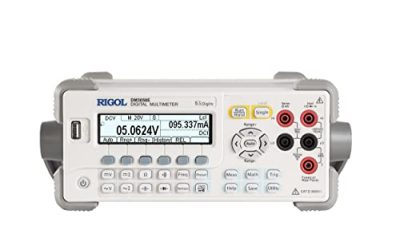
| Rigol DM858E | 20,000 points | 7-inch color touch screen | USB and LAN with Web Control |
| UNI-T UT8804E | 20,000 recorded groups with statistics | 4.3-inch TFT LCD | USB Device with PC software |
The two OWON meters pair a compact footprint with a modest internal store, which suits short, structured exercises. The Rigol and the UNI-T hold 20,000 readings or recorded groups, so they fit longer runs, repeated trials and post-session analysis. All four log without a computer attached, and all four offer a way to move the data onto a computer afterwards.
How to Choose
Logging memory depth. Memory size decides how long a bench can record before someone has to stop and clear space. A 1,000-point store comfortably holds a single lab period of sampled readings, such as a warm-up curve captured every few seconds. A 20,000-point store holds long discharge runs, overnight-style soak exercises compressed into a lesson, or a full week of short sessions between downloads. For training, match the memory to the longest exercise on the syllabus, not the average one.
Logging interval and reading rate. Timed logging and fast capture are different jobs. A meter that records at a set interval, anywhere from fractions of a second to many minutes between points, is the right tool for slow changes like temperature drift or battery discharge. The headline reading rate, given in readings per second, matters when the signal itself changes quickly. Check both figures on the listing: a high reading rate with a tiny memory fills up in moments, while a deep memory with a slow measuring rate misses fast events entirely.
How data leaves the meter. Internal memory is only useful if the records can be collected afterwards. The simplest path is a USB export to a computer. SCPI command support over USB or RS232 lets instructors script the meter from lab software and pull readings into a shared worksheet. A LAN connection with browser-based control goes further, letting one instructor open a student bench on a classroom screen. Decide which collection routine the course will actually use, then buy the interface that supports it.
Accuracy and counts. The count figure describes how finely the display can resolve a reading, and the DC voltage accuracy figure describes how close that reading sits to the true value over a stated period, usually one year. Training exercises that teach tolerance checking, calibration awareness or pass and fail decisions need those numbers in writing on the listing, so students can compare their recorded results against a stated specification instead of guessing.
Display and dual measurement. A dual display shows two related quantities at once, such as voltage and current through the same device, which halves the wiring changes during demonstrations. A larger touch screen helps when a group watches from a step back. For individual student benches, a clear 3.5-inch or 4.3-inch screen is usually enough, since the logged record matters more than the live view.
Power and footprint. Fixed benches suit mains-powered meters that are always ready. Battery-powered bench meters free up outlets and travel between rooms on a cart, but a class set needs a charging routine so no group starts a session with a flat battery. Footprint matters too: shallow meters leave room on the bench for the circuit under test, leads, notebooks and the computer that collects the data.
The Picks in Detail
1. OWON XDM1041 — Compact Bench Meter With Timed Internal Logging
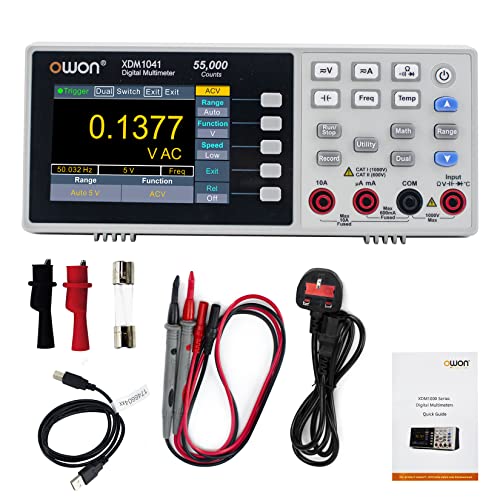
The XDM1041 is the straightforward teaching-bench option. Its listing states that measured data can be recorded manually or automatically into internal memory and shown in a table on the meter, and the meter can be controlled from PC software over its USB port with SCPI commands. The logging interval can be set anywhere from 15 ms to 9999.999 s, so one exercise can sample a fast warm-up transient while the next takes a single point every few minutes across a whole lesson. With 55,000 counts and DC voltage accuracy up to 0.05 percent, the readings carry enough resolution for tolerance and calibration exercises, and the dual line display shows two measurements together during demonstrations.
Specs
- Display: 3.5-inch TFT LCD, 480 by 320, with dual line display
- Resolution: 55,000 counts
- Data logging: 1,000 points stored in internal memory, manual or auto record, exportable to a PC
- Logging interval: adjustable from 15 ms to 9999.999 s
- Reading rate: up to 65 readings per second
- DC voltage accuracy: up to 0.05 percent
- Ranges: DC voltage 50 mV to 1000 V; AC voltage 500 mV to 750 V; current 500 microamps to 10 A; resistance 500 ohms to 50 megohms; capacitance 50 nanofarads to 50 millifarads; frequency 10 Hz to 60 MHz
- Interfaces: USB and RS232, with SCPI support and PC software control
- Temperature: K-type and PT100 inputs; True RMS AC measurement
Best for: fixed teaching benches where instructors want timed logging plus scripted control of the meter from lab software.
Watch out for: the 1,000-point store fills quickly at fast intervals, so long exercises need a slow interval or regular downloads; the temperature probe is not included.
See the OWON XDM1041 on Amazon
2. OWON XDM1241 — Battery Bench Meter That Records Away From the Outlet

The XDM1241 takes the same record-keeping idea and puts it in a slim, battery-powered body. Its listing states a data recording function with manual and auto record modes that store data in internal memory at the same time, after which the collected data can be exported to a computer or viewed directly on the meter. A built-in lithium battery provides up to 8 hours of work, and the meter also runs from a DC 5 V, 2 A supply, so a training cart can carry logging benches into rooms where every outlet is already taken. The 3.5-inch screen has an adjustable backlight for bright classrooms, and the dual display function shows two measurement functions at once.
Specs
- Data recording: manual and auto record functions store readings in internal memory; data can be exported to a computer or viewed on the meter
- Record length: 1,000 points, per OWON documentation for the series
- Power: built-in lithium battery with up to 8 hours of work; DC 5 V, 2 A supply support
- Display: 3.5-inch high-resolution LCD with adjustable backlight and dual display
- Measurements: AC and DC voltage and current, resistance, capacitance, continuity, diode, frequency and temperature
- True RMS capability, with a built-in safety fuse for over-range protection
Best for: mobile training carts, field exercises and benches short on free outlets, where a logging meter has to run untethered for a full session.
Watch out for: a class set needs a charging routine between sessions, and its record memory is the joint-smallest in this roundup, so plan intervals around shorter exercises.
See the OWON XDM1241 on Amazon
3. Rigol DM858E — Touch Screen Bench Meter With 20,000-Point Logging

The DM858E is built for shared and networked teaching spaces. Rigol’s datasheet for the model lists a data logging memory of 20,000 points, a maximum reading rate of 80 readings per second and DC voltage accuracy of 0.06 percent over one year, behind a 7-inch color touch screen that shows dual measurements and trend charts. The meter connects over USB and LAN, and its Web Control feature lets an instructor open a student bench in a browser to check a logged run without walking the room. It is powered through a Type-C connection and can run from a suitable power bank, which makes it easy to move between demonstration benches. Eleven measurement functions, including two-wire and four-wire resistance, temperature and capacitance, cover the usual training syllabus.
Specs
- Resolution: 5.5 digits, 120,000 counts
- Data logging memory: 20,000 points
- Reading rate: up to 80 readings per second
- DC voltage accuracy: 0.06 percent (1 year)
- Display: 7-inch color touch screen, 1024 by 600, with dual measurement display and trend charts
- Measurement functions: 11, including 2-wire and 4-wire resistance, temperature and capacitance; True RMS AC voltage and current
- Interfaces: USB Host, USB Device and LAN with Web Control; powered through a Type-C connection
- Maximum current measurement: 3 A
- Size and weight: 266 by 165 by 80 mm; about 1.23 kg
Best for: demonstration benches and networked classrooms, where a large touch screen and browser-based control help an instructor follow several logging benches at once.
Watch out for: current measurement tops out at 3 A, lower than the other picks here; the DM858 sibling without the E carries a much larger logging memory and different accuracy figures, so confirm the exact model name on the listing before ordering a class set.
See the Rigol DM858E on Amazon
4. UNI-T UT8804E — Statistics and Trend Charts for Coursework

The UT8804E is organised around recorded data. UNI-T’s datasheet for the model lists a data record capacity of 20,000 groups with recording and readback, alongside maximum, minimum, average and peak statistics, a comparison function for pass and fail decisions, and trend chart capture. Recorded runs can be examined on the 4.3-inch TFT color display as statistics or as a trend chart, and a USB Device connection links the meter to PC software for remote viewing, control and historical data analysis. The listing includes the USB interface cable and test leads with alligator clips. Basic DC voltage accuracy is 0.025 percent, and a low-pass filter helps when coursework involves noisy or variable-frequency signals.
Specs
- Display resolution: 59,999 counts
- Data recording: 20,000 groups with recording and readback, maximum, minimum, average and peak statistics, comparison measurement and trend chart
- Basic DC voltage accuracy: 0.025 percent
- Display: 4.3-inch TFT color LCD with bar graph
- Interface: USB Device connection to PC software for remote viewing, control and historical data; USB interface cable and test leads with alligator clips included
- Ranges: DC voltage 60 mV to 1000 V; AC voltage 60 mV to 1000 V (True RMS); resistance up to 60 megohms; capacitance 6 nanofarads to 60 millifarads; frequency up to 60 MHz; frequency response 100 kHz; low-pass filter (LPF)
- Measuring rate: 2 readings per second
Best for: coursework built around recorded runs, where students hand in statistics, trend charts and pass or fail comparisons rather than single spot readings.
Watch out for: the 2 readings per second measuring rate suits deliberate logging, not fast transient capture; the Amazon listing covers the wider UT8000E series, so confirm the UT8804E style is the one selected before ordering.
See the UNI-T UT8804E on Amazon
Which One Fits
For a fixed bench that an instructor scripts from lab software, the OWON XDM1041 fits: timed logging, SCPI control and a compact body. For training that moves between rooms or outdoors, the OWON XDM1241 fits, since its battery carries a full session and its records export afterwards. For a shared demonstration bench or a networked classroom, the Rigol DM858E fits, with the big touch screen, 20,000-point memory and browser control. For coursework graded on analysis, the UNI-T UT8804E fits, because its statistics, comparison function and trend charts turn a logged run into the hand-in material itself.
Common Mistakes
Buying a bench meter with no record function. A clear screen and high counts do not add logging later. If the listing and documentation do not state a record function, stored readings or a PC logging path, the meter cannot capture a session, whatever the software promises.
Letting memory fill mid-exercise. A 1,000-point store recording every 15 ms is full in seconds. Work out the interval from the session length first: total points divided by the lesson duration gives the slowest safe interval, and a trial run before the class confirms it.
Confusing sibling models. The DM858 and DM858E differ in logging memory, reading rate and accuracy, and the UT8804E sits inside a series listing with several styles. Check the exact model name and style on the listing so the delivered meter matches the specification the course was planned around.
Skipping the collection routine. Decide before the term starts how records leave each bench: USB export after class, scripted pulls over SCPI, or browser sessions over the lab network. Confirm the cables and software are in place, because a logged run nobody can collect teaches nothing.
Logging current with leads in the wrong jacks. Current measurements need the leads in the current terminals, and the meters here state fuse protection for a reason. Build the lead check into the exercise sheet so students confirm placement before they start a recording.
FAQ
How much logging memory does a training exercise actually need?
It depends on session length and interval. A one-hour exercise sampled every five seconds uses about 720 points, which fits the 1,000-point OWON meters. Longer runs, faster sampling or several sessions between downloads call for the 20,000-point memory of the Rigol DM858E or the 20,000 recorded groups of the UNI-T UT8804E.
Can an instructor gather data from several student benches?
Yes, and the interface decides how easy it is. The OWON XDM1041 accepts SCPI commands over USB and RS232, so lab software can poll benches in turn. The Rigol DM858E adds LAN with Web Control, so an instructor can open a bench in a browser. The other picks export over USB after the session.
What is the difference between internal logging and PC logging?
Internal logging stores readings in the meter’s own memory, so the bench records on its own and the data is collected later. PC logging streams or transfers readings to software on a connected computer, which suits live worksheets and historical analysis. All four picks here record internally; the XDM1041, DM858E and UT8804E also document a PC path.
Do these meters log temperature as well as voltage and current?
Yes. Each pick measures temperature as part of its function set: the OWON XDM1041 lists K-type and PT100 inputs, the XDM1241 lists temperature among its measurements, and the Rigol DM858E and UNI-T UT8804E both include temperature among their measurement functions. Note that the XDM1041 listing states the temperature probe is not included.
Conclusion
For technical training, the logging specification is the syllabus in disguise: it decides which experiments students can run and what evidence they can hand in. Choose the OWON XDM1041 for scripted, timed logging on fixed benches, the OWON XDM1241 when the bench has to travel, the Rigol DM858E for networked rooms and demonstration work, and the UNI-T UT8804E when the coursework lives in statistics and trend charts. Match the memory depth and the collection routine to the longest exercise on the plan, and every bench in the room will still be recording when the lesson ends.
More from Amazon
Programs that pair well with the guide above. Offers and eligibility are set by Amazon and may change.
Free shipping on eligible items, Prime Video and more. Eligible new members can start with a free trial.
Start a Prime free trialAudiobooks and podcasts to listen to on the go. Eligible new members can start with a free trial.
Try Audible freeAd-free music streaming. Eligible new subscribers can start with a free trial.
Try Music Unlimited freeA free business account with business pricing and bulk-buying tools for work, shop or home office.
Create a business accountAs an Amazon Associate we earn from qualifying purchases.


Write Your Review
No reviews yet. Be the first to share your experience!