

Key takeaways
- Compare four commercial hot-roll laminators for training departments on width, film range, speed and warm-up, from 27-inch machines to a desktop unit.
A training department does not laminate like a front office. The real decision is whether one shared machine can turn around a full class set of handouts, wall charts and signage in the gap between sessions, week after week, without a specialist standing over it. That means roll film instead of pouches, a throat wide enough for your largest regular print, and loading simple enough that any instructor can change a roll without ruining it.
This guide is for training managers, department coordinators and office leads equipping a shared training room. Every pick below is a commercial hot-roll laminator sold on Amazon, chosen from the width, film range, speed and warm-up figures printed in its product title and listing details, so the numbers here come from the listings themselves rather than brochure promises.
Quick Picks
As an Amazon Associate we earn from qualifying purchases
| Product | Best for | Key spec from title |
|---|---|---|
| GBC Ultima 65 Thermal Roll Laminator | Shared training rooms laminating posters and handouts | 27-inch maximum width |
| USI ARL 2700 Thermal Roll Laminator | Materials handled daily that need thicker film | Film up to 5 mils thick |
| Tamerica TCC-2700XM Roll Laminator | Training centers that also mount display boards | 1.5 to 10 mil film range |
| GBC Ultima 35 EZLoad Roll Laminator | Small departments laminating at a desk | Under 2-minute warm-up |
How to Choose
Match the Width to Your Largest Weekly Job
Measure the widest item your department laminates every week, not the biggest poster printed once a year. A 27-inch throat swallows standard training posters, flip-chart sheets and two letter pages side by side, which is why most shared training rooms land on that size. A 12-inch machine still covers handouts, tent cards and certificates, and it fits on a desk instead of a dedicated cart. Oversizing wastes bench space and film on every run; undersizing forces awkward double passes that crease prints and eat instructor time before a session.
Film Thickness and Core Size Set Your Consumables
Roll film is not interchangeable. Check three figures on the listing before anything else: the maximum film thickness in mil, the core size the mandrels accept, and whether the machine only takes a proprietary loading system such as EZLoad rolls with color-coded end caps. Thin 1.5 mil film keeps costs down for handouts that are replaced each course, while 5 mil and thicker film survives daily handling on reference cards and safety signage. If your storeroom already holds standard 1-inch core rolls, a proprietary-only machine turns that stock into dead inventory overnight.
Speed and Warm-Up Decide the Pre-Session Rush
Most training lamination happens in one compressed window: the hour before a course begins. Warm-up time is dead time in that window, and the listings here range from under two minutes to fifteen, so a slow machine has to be switched on before anyone has decided what needs laminating. Running speed matters next. Figures are quoted in feet or inches per minute, and a faster machine clears a class set of thirty handouts in one pass sequence while a slower one is still working through the stack as learners arrive.
Shared Rooms Need Foolproof Loading and Safety Controls
In a training department the operator changes constantly, so judge controls by the least experienced person who will use the machine. Color-coded film loading, a footage counter and a ready light with an audible alert all reduce the classic shared-machine failures: film loaded upside down, adhesive baked onto the rollers and rolls running out mid-batch. Safety hardware matters just as much in a room learners walk through. Look for a safety shield over the heated rollers, a motor key lock, auto shut-off after inactivity and a reverse function for clearing misfeeds without opening the machine.
The 4 Best Options
GBC Ultima 65 Thermal Roll Laminator
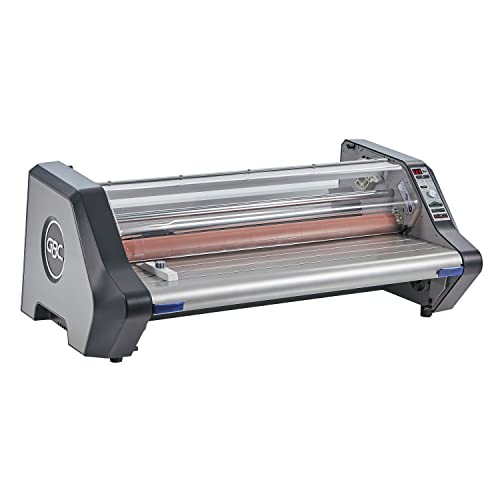
The Ultima 65 is the default shared-room choice for departments that laminate posters and teaching aids alongside everyday handouts. Its 27-inch width takes the largest standard training prints in a single pass, and the AutoSpeed feature picks the running speed for the loaded film, which removes the most common setup mistake when different instructors share one machine. EZLoad end caps make roll changes hard to get wrong. Warm-up runs to about ten minutes, so it suits rooms that switch the machine on at the beginning of the day and keep it working.
Specs
- Maximum laminating width: 27 inches
- Warm-up time: 10 minutes
- Rollers: 2
- Laminating speed: 8 feet per minute
- Film: EZLoad roll film up to 3 mil
- Model: 1710740
Best for: A central training room where many instructors share one machine for posters, charts and handouts.
Watch out for: It only takes EZLoad film with color-coded end caps, so confirm the film type on every supply order.
ASIN: B0000AQOJY
USI ARL 2700 Thermal Roll Laminator

Departments whose materials get handled hard — safety cards, machine-side job aids, reference charts that live on the training-room wall — get the most from the ARL 2700. It runs film up to 5 mil thick, noticeably sturdier than the 3 mil ceiling on the GBC machines here, and its adjustable temperature with a digital readout lets an experienced operator dial in each film instead of guessing. The variable-speed motor, electric reverse and key lock suit a room with one trained owner and many occasional users.
Specs
- Maximum laminating width: 27 inches
- Film thickness: up to 5 mil on a 1-inch core
- Warm-up time: 15 minutes
- Temperature: adjustable with digital readout
- Motor: variable speed with electric reverse
- Safety: motor key lock and wraparound prevention bar
- Certification: UL Listed
- Warranty: 2 years
- Weight: 96 pounds
Best for: Departments laminating thick, long-life materials that trainees and staff handle every day.
Watch out for: The 15-minute warm-up is the slowest here, so build switch-on time into the room schedule.
ASIN: B01NBYYAG3
Tamerica TCC-2700XM Roll Laminator

The TCC-2700XM is the pick when a training center also produces its own signage and display boards. Alongside a 27-inch laminating width it mounts boards up to a quarter inch thick, and its film range runs from 1.5 to 10 mil — the widest span in this guide — so one machine covers disposable handouts and rigid, long-life displays. Heated rollers, adjustable temperature and a built-in trimmer keep the whole job on one bench. At 114 pounds it is a permanent fixture, not a machine that moves between rooms.
Specs
- Laminating width: 27 inches
- Film thickness: 1.5 to 10 mil
- Laminating speed: 8.8 feet per minute
- Warm-up time: 5 minutes
- Rollers: heated, with adjustable temperature and Celsius/Fahrenheit conversion
- Mounting: boards up to 1/4 inch thick
- Trimmer: built-in horizontal trimmer
- Weight: 114 pounds
Best for: Training centers that laminate and mount signage, instructions and display boards in-house.
Watch out for: Temperature and speed are manual settings, so post a settings chart for each film your department stocks.
ASIN: B009PKU3FI
GBC Ultima 35 EZLoad Roll Laminator

Not every department needs a wide machine. The Ultima 35 EZLoad covers the handout-and-certificate workload — anything up to 12 inches wide — from a desktop, and it is ready in under two minutes, the fastest warm-up here by a wide margin. AutoSpeed and EZLoad loading keep operation simple for instructors who laminate a few times a month, and the built-in trimmer finishes pieces without a separate cutting station. It cannot take poster-size prints, so it works best as the only machine in a small department or as a satellite unit for a second training room.
Specs
- Maximum laminating width: 12 inches
- Warm-up time: under 2 minutes
- Laminating speed: 36 inches per minute with AutoSpeed
- Film: EZLoad roll film up to 5 mil
- Features: built-in trimmer and reverse function
- Weight: 41.8 pounds
- Model: 1701680
Best for: Small departments whose lamination is handouts, tent cards and certificates at a shared desk.
Watch out for: The 12-inch throat cannot take poster-size prints, and it only accepts EZLoad film rolls.
ASIN: B001B0ESYM
Which One Fits Your Situation
One Central Training Room Serving Every Instructor
Choose the GBC Ultima 65. A single shared room needs width for posters, loading that survives constant operator changes and speed that clears class sets quickly. The Ultima 65 covers all three, and its AutoSpeed setting removes the temperature-and-speed guesswork that causes most shared-machine failures. Budget bench or cart space for it permanently, and switch it on before the first session of the day.
Materials That Get Handled Every Day
Choose the USI ARL 2700. Daily-handled pieces — safety cards, equipment job aids, wall reference charts — need film thicker than the standard 3 mil ceiling, and the ARL 2700 runs up to 5 mil. Its digital temperature readout and variable speed reward a department that assigns one person to own the settings, and the key lock keeps casual users from changing them.
A Training Center That Mounts Its Own Signage
Choose the Tamerica TCC-2700XM. If the department produces foam-board signage, mounted instructions and rigid displays alongside ordinary lamination, this is the only machine here that mounts boards up to a quarter inch thick. Its 1.5 to 10 mil film range covers both ends of that workload, and the built-in trimmer finishes mounted pieces on the same bench.
A Small Department With One Shared Desk
Choose the GBC Ultima 35 EZLoad. When lamination means handouts, tent cards and certificates rather than posters, a 12-inch desktop machine is enough, and its under-two-minute warm-up fits work that arrives in small, unplanned batches. It also leaves budget room to stock several film types instead of concentrating everything in one large machine.
Common Mistakes
- Buying a pouch laminator for roll-film volume, then paying per-pouch supply costs on every class set.
- Ordering standard-core film for a machine that only accepts EZLoad rolls, or standard rolls in the wrong core size.
- Sizing the machine for the largest poster printed once a year instead of the widest job that runs every week.
- Ignoring warm-up time when scheduling the room, so the machine is still heating as learners arrive.
- Skipping the stand or cart in the plan; the larger machines here weigh from 96 pounds upward and need a fixed home.
Frequently Asked Questions
Do roll laminators laminate both sides in one pass?
Yes. A hot-roll machine carries two film rolls, one above and one below the material, so a single pass seals the front and back at the same time. That is the core difference from a pouch machine, and it is why roll lamination suits class sets: pieces feed continuously instead of one pouch at a time.
Which film thickness should a training department stock first?
Begin with the thickness your most common job needs. For handouts replaced each course, 1.5 or 3 mil film on the roll size your machine accepts covers nearly everything. Add a thicker roll — up to 5 mil on machines that accept it — only for pieces that stay in circulation, such as reference cards and posted instructions.
Can any instructor run one of these machines, or does it need a specialist?
Machines with automatic speed selection and color-coded film loading are designed for occasional users, and most departments let any instructor run them after a short briefing. Models with fully manual temperature and speed controls produce better results with one trained owner who sets them for each film type and posts the settings beside the machine.
Where should a roll laminator live in a training department?
Give it a fixed home on a sturdy bench or its own cart, close to the room where materials are used but out of the main walkway learners take. The larger machines here weigh from 96 pounds upward and their heated rollers need clearance and adult supervision, so plan the space, the power point and film storage together before the machine arrives.
More from Amazon
Programs that pair well with the guide above. Offers and eligibility are set by Amazon and may change.
Free shipping on eligible items, Prime Video and more. Eligible new members can start with a free trial.
Start a Prime free trialAudiobooks and podcasts to listen to on the go. Eligible new members can start with a free trial.
Try Audible freeAd-free music streaming. Eligible new subscribers can start with a free trial.
Try Music Unlimited freeA free business account with business pricing and bulk-buying tools for work, shop or home office.
Create a business accountAs an Amazon Associate we earn from qualifying purchases.






Write Your Review
No reviews yet. Be the first to share your experience!